


Most small business owners assume that once their website is live, Google handles the rest. It crawls the site, decides it is relevant, and starts sending traffic. That assumption is partly true, and mostly dangerous.
Google does crawl your site. But what it finds, how it indexes it, which pages it chooses to rank, and what keeps those pages from performing better: none of that is visible to you by default. Google Search Console changes that. It is a free tool from Google that gives you direct access to the data Google already has about your site. Understanding that data is the difference between a website that grows your business and one that quietly sits there costing you hosting fees.
This guide explains what Google Search Console is, what its key reports actually tell you, and how to act on that information to expand your search reach.
What Google Search Console Is
Google Search Console (GSC) is a free web service provided by Google that lets website owners monitor, maintain, and troubleshoot their site's presence in Google search results. It is not an analytics platform in the traditional sense. Where Google Analytics tells you what happens after a visitor lands on your site, GSC tells you what happens before: what Google found when it crawled your pages, what queries your site appeared for, how often it appeared, and how often people clicked.
Think of it as your direct line to Google's perspective on your website. If Google cannot crawl a page, GSC tells you. If a page is indexed but ranking for keywords you never intended, GSC shows you. If your site's performance is dragging your rankings down, GSC flags it.
Access is free. You verify ownership of your domain, and Google grants you access to the data it has collected about your site. No third-party subscriptions, no API fees, no paywalled reports.
Setting Up Google Search Console
Setup takes about ten minutes if you have access to your domain or website backend.
Go to search.google.com/search-console and sign in with the Google account you want associated with your property. Add your website as a new property. GSC will ask you to verify ownership to confirm you are authorized to see the data. Verification methods include adding an HTML tag to your site's <head>, uploading a small HTML file to your server, or connecting through Google Analytics if you already have that installed.
Once verified, GSC begins collecting data. The first few days of data are sparse. Give it two to four weeks before drawing conclusions from the Performance report.
Connect GSC to Google Analytics: Linking the two tools in your Analytics property settings allows you to see organic search performance alongside on-site behavior in one place. This is worth doing immediately after verification.
The Performance Report: Your Visibility Dashboard
The Performance report is where most site owners spend the majority of their time in GSC, and for good reason. It shows four core metrics for any date range you select:
- Total Clicks: How many times users clicked a link to your site from Google search results.
- Total Impressions: How many times your site appeared in search results, regardless of whether it was clicked.
- Average CTR (Click-Through Rate): The percentage of impressions that resulted in a click. Calculated as clicks divided by impressions.
- Average Position: Your average ranking position across all queries where your site appeared.
Below the summary metrics, you can filter by query, page, country, device, or search type. The query breakdown is the most valuable starting point for most business owners. It shows you the exact search phrases people used to find your site and how your site performed for each one.
Look for queries with high impressions but low CTR. A page appearing 2,000 times a month for a relevant query but converting less than 2% of those impressions into clicks is leaving significant traffic on the table. The fix might be a stronger title tag, a more compelling meta description, or a schema markup addition that earns rich results like star ratings in the search listing.
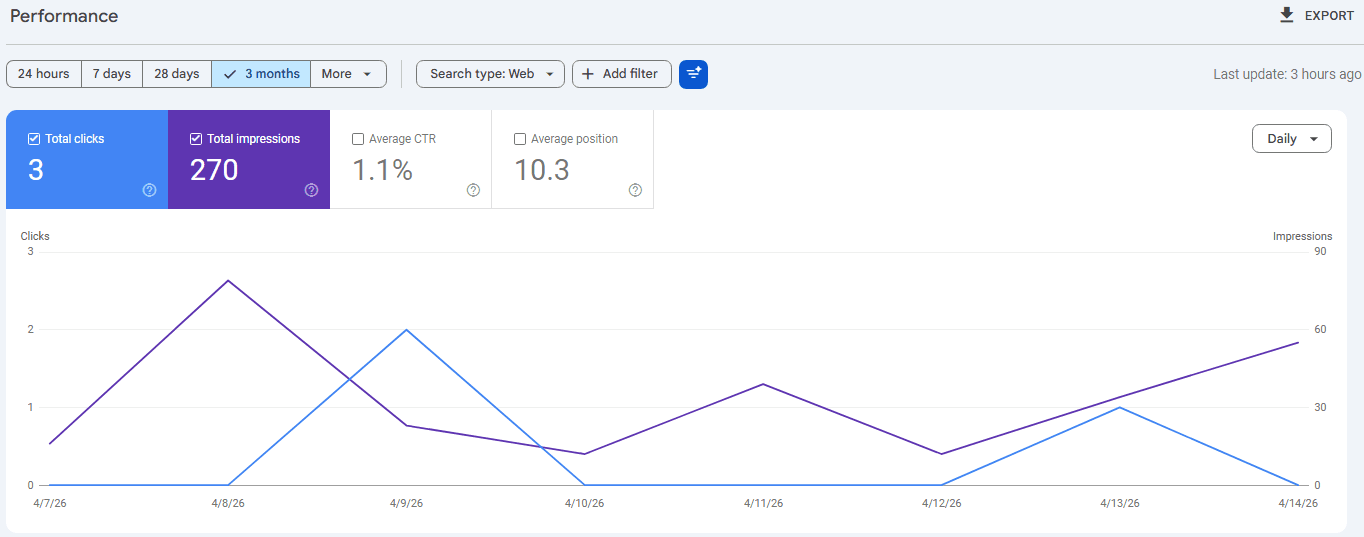
Also pay attention to position improvements over time. A page that moved from position 14 to position 8 for a high-volume query is a signal that additional optimization work could push it into the top five, where the majority of clicks concentrate.
Index Coverage: Is Google Actually Seeing Your Pages?
Indexing is the process by which Google adds your pages to its database of content that can appear in search results. A page that is not indexed cannot rank. Full stop.
The Index Coverage report (now called the "Pages" report in the updated GSC interface) shows you the status of every URL Google has discovered on your site:
- Indexed: Pages successfully included in Google's search index.
- Not indexed: Pages Google found but chose not to include, with a reason provided.
- Errors: Pages Google attempted to crawl but could not access.
The "not indexed" category deserves close attention. Common reasons include "Crawled, currently not indexed" (Google found the page but decided it was not worth indexing), "Duplicate without canonical tag" (Google found multiple versions of the same page and is not sure which one to use), and "Blocked by robots.txt" (your own configuration is preventing Google from accessing certain pages).
Many small business sites have unintentional indexing gaps. A service page added three months ago that never got linked from the navigation may have zero indexed status because Google never discovered it. A thank-you page that should not be indexed might be in the index, diluting the site's overall quality signals. The Coverage report makes these problems visible.
URL Inspection: Diagnosing Individual Pages
The URL Inspection tool lets you enter any URL on your domain and see exactly what Google knows about that specific page. This is your debugging tool for individual pages that are not ranking or not appearing in search at all.
The inspection shows you whether the URL is indexed, the last time Google crawled it, the canonical URL Google selected (which may differ from the one you intended), and whether any mobile usability or structured data issues were detected on that page.
If a page is not indexed, you can request indexing directly from this tool. Google does not guarantee it will index the page immediately, but the request does prompt Google's crawlers to revisit the URL. For important new pages, like a new service page or a recently published blog post, submitting the URL through inspection is a useful way to accelerate the process rather than waiting for Google's next crawl.
Core Web Vitals: Page Speed as a Ranking Factor
Google confirmed Core Web Vitals as a ranking factor in 2021, and the signals have grown more significant in subsequent algorithm updates. The Core Web Vitals report in GSC shows you how your pages perform across three measurements:
- Largest Contentful Paint (LCP): How long it takes for the main content of a page to load. Google targets under 2.5 seconds.
- Interaction to Next Paint (INP): How responsive the page is to user interactions like clicks and taps. Google targets under 200 milliseconds.
- Cumulative Layout Shift (CLS): How much the page layout shifts unexpectedly during loading. Google targets a score under 0.1.
Pages are grouped into Good, Needs Improvement, and Poor categories. Any URLs flagged as Poor are actively receiving a ranking penalty relative to competitors with better performance. The report segments results by mobile and desktop separately, since most local business traffic skews heavily toward mobile.
Speed issues on small business sites usually trace back to the same few culprits: uncompressed images, render-blocking scripts loaded in the wrong order, third-party chat widgets, and low-quality shared hosting. The Core Web Vitals report gives you a starting point. Pairing it with Google's PageSpeed Insights tool gives you the specific fixes.
The Links Report: Understanding Your Authority
Search engines use links as votes. A link from another website to yours signals to Google that your content is credible and worth recommending. The quantity and quality of those links, collectively called backlinks or inbound links, directly influence how much authority Google assigns your domain.
The Links report in GSC shows you two things: which external sites link to yours, and which of your internal pages link to other pages on your own site.
The external links section reveals your backlink profile. For most small business sites, this list is short. That is expected. But reviewing it periodically helps you spot low-quality or spammy links that could be hurting your rankings. It also tells you which of your pages attract links naturally, a signal about which content topics resonate with your audience and with other site owners.
The internal links section shows how Google sees the architecture of your own site. Pages with many internal links pointing to them receive more crawl attention and more authority from Google's perspective. If a key service page has very few internal links pointing to it, adding relevant links from your blog posts or homepage is a straightforward way to signal its importance.
"The sites that rank consistently well are the ones that understand how Google actually evaluates them, not just the ones that guess."
Sitemaps: Guiding Google Through Your Content
A sitemap is an XML file that lists every URL on your site you want Google to crawl and index. Submitting a sitemap through GSC does not guarantee indexing, but it ensures Google knows your pages exist and gives crawlers a clear roadmap.
The Sitemaps report in GSC shows you the status of any submitted sitemaps, including how many URLs were submitted and how many were successfully indexed. A large gap between submitted and indexed counts is worth investigating through the Index Coverage report.
Most modern website platforms and frameworks generate sitemaps automatically. If your site is built on WordPress, a plugin like Yoast or RankMath handles it. Next.js projects can export a sitemap programmatically. Once generated, submit the sitemap URL directly through GSC. Resubmit it whenever significant new content is added.
Turning Data Into Action
GSC data has no value if it sits unreviewed. A practical review cadence for most small business owners is monthly for the Performance report and quarterly for the technical reports (Coverage, Core Web Vitals, Links).
During each monthly Performance review, look for three things:
- Queries where your position improved. These pages are gaining momentum and may be worth additional internal linking or content updates to push them higher.
- Pages with high impressions and low CTR. Rewrite the title tag and meta description for these pages to be more specific and compelling.
- Queries you are ranking for that you did not intentionally target. These reveal topics your audience cares about that you could build additional content around.
During quarterly technical reviews, address any new errors in the Coverage report and check whether Core Web Vitals scores have degraded, especially if your site received plugin updates, design changes, or new third-party script additions in the prior quarter.
The pattern over time is what matters most. A site that consistently resolves indexing errors, improves page speed, builds relevant backlinks, and refines its on-page optimization for its best-performing queries will see compounding growth in organic reach. There is no shortcut to that outcome, but GSC gives you the exact data you need to work systematically toward it.
Echo Effect conducts full Google Search Console audits as part of every website project and SEO engagement. If you have never looked at your GSC data or you are not sure what you are looking at when you do, contact us for a free review. We will show you exactly what Google sees and map out the steps to improve it.